An official website of the United States government




Radiology Imaging Library
The Radiology Imaging Library maintains an Enterprise Image Exchange Service account with PowerShare by Nuance Communications. This service allows the Radiology Imaging Library to receive outside imaging from other facilities within the PowerShare network for screening and referral purposes. PowerShare may be accessed via at the website Nuance PowerShare Network.
Patients may upload DICOM format radiology images directly to the NIH – RADIS/CC PowerShare account via the Nuance PowerShare Network Easy Upload page.
PowerShare account provisioning for NIH employees is handled via the Radiology Imaging Library. Patients and prospective patients may register as individuals via the login page.
For questions, please contact the Digital Imaging Library by email CC-RAD&ISDigitalImageLibrary@cc.nih.gov or by phone 301-496-2729.
The Radiology Imaging Library uses an NIH approved secure file sharing service, BOX, to upload imaging studies performed outside of the Clinical Center to the Radiology Imaging Library. The images will be available for your NIH clinical contact service or representative to review.
Mac Box Instructions for Radiology Imaging Library Uploads | 01:04
Windows Box Instructions for Radiology Imaging Library Uploads | 01:04
Step 1: Right Click on your home screen and create a folder.
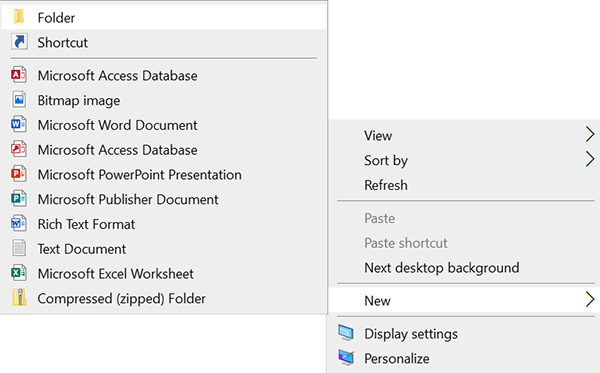
Step 2: Name the folder:
- First 3 letters of patient's last name (Doel),
- First 3 letters of patient's first name (John),
- Patient's DOB (mmddyyyy) (Jan. 1, 1980),
- Eg. doejoh01011980.
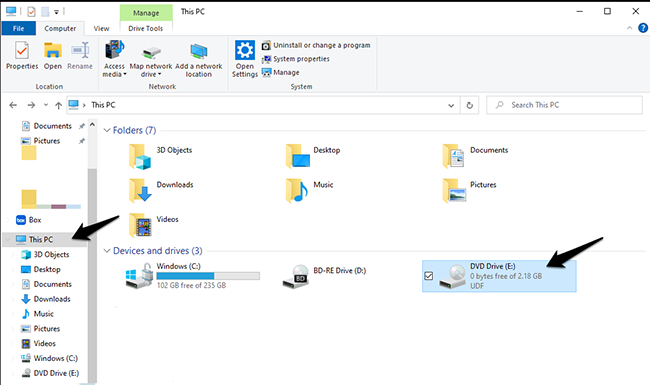
Step 3: Find the location where the imaging data is stored. Usually under the disc drive when pulling the data from a disc.
Step 4: Highlight all files and copy the folder. Press and hold the Shift Key and then right click with the mouse and select copy.
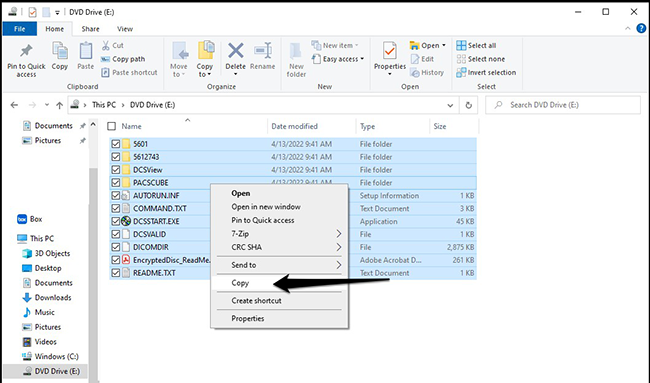
Paste the copied files inside the empty folder you created in Step 1.
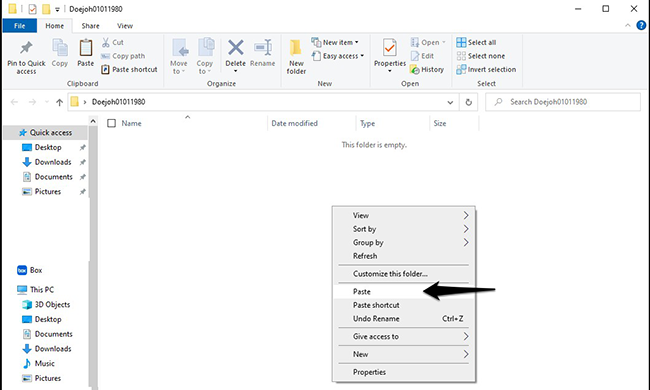
Step 5: Compress the folder.
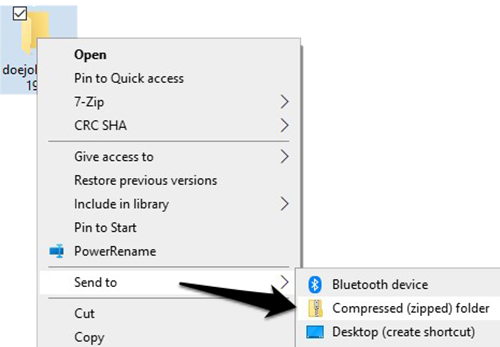
- Right mouse click on the study folder. Select "Send To: Compressed (zipped) Folder." The will create a new compressed file, with the extension .zip.
Step 6: Upload the file using the below BOX:
- Drag and drop your file into the box above or depress Select Files to choose your Zip file.
- Enter all required information in the fields located beneath the Upload Files box.
Name
Date of Birth
NIH Contact Source (name)
Sender Email Address
Radiology Exam Description (Exams Only)
- Select the Submit button once.
- Select the Upload button once.
- You will receive the following message on-screen after the upload has been successful:
Success. Your file has been uploaded, and the owner has been notified.
A note about file size:
- Users uploading files through Internet Explorer versions 6, 7 and 8 can upload files up to 2 GB in size.
- Users uploading files through Internet Explorer versions 9, 10 and 11 can upload files up to 4 GB in size.
- Google Chrome allows file uploads up to the 5 GB maximum.
- The maximum file size is 5 GB. If your file is larger than the maximum for your browser, you may need to create multiple zip files.
- Please note: It may take 1 to 2 business days for data uploaded to become available for clinical review.
BOX is a secure commercial site approved by NIH which provides an easy and fast method for sending and receiving large files. For additional details, please contact the Radiology Imaging Library or review the BOX website.
Introduction
The NIH Clinical Center (CC) is committed to protecting the privacy of CC patient information contained in NIH information systems. The CC Health Information Management Department (HIMD) uses BOX, an NIH approved third party secure file sharing service, to send/ receive forms to registered CC patients. The NIH agency's Privacy Policy, but does not apply. In this instance, the BOX Privacy Policy applies and is located at https://www.box.com/legal/privacypolicy.
Purposes and Use of Information We Collect from You
This Privacy Notice explains the collection and use of Personally Identifiable Information (PII) about you through the CC HIMD Website. The BOX application presents a form and asks for your name, your e-mail and an open text message. The information collected reflects the minimum necessary to accomplish the purpose of uploading the signed Authorization for the Release of Medical Information form, and other patient completed authorization forms (patient portal consents, etc.) to the CC Health Information Management Department.
By using the third-party BOX Website to send signed document(s) to the NIH CC Health Information Management Department, you may be providing nongovernmental third-parties with access to PII and/or sensitive information. Please note that by voluntarily providing your information and uploading documents into this site, you are accepting the practices described in this Privacy Notice and consent to the collection, storage, and use of personal information about you as described in this Notice. Use of this service is optional. If you do not wish to use this service, but still wish to send the signed document, you may mail the document to CC Health Information Management Department, 10 Center Drive, Room B1L400, MSC 1192 Bethesda, MD 20892 or fax to 301-480-9982.
Security of Information
At all times, security maintenance and administration is an important part of website operations and maintenance. BOX maintains approved physical, electronic and procedural safeguards to comply with federally approved standards to guard your nonpublic personal information. The system uses appropriate administrative, technical and physical controls for protection of information contained therein and is protected by multiple firewalls, vulnerability scanning, and advanced encryption technology. Access to your information requires entry of a personalized username and password by CC HIMD staff. In non-routine circumstances, system administrators at BOX may have incidental exposure to your information during unexpected events such as data recovery.
Contact Us
If you have any questions or concerns regarding this Privacy Notice, please call the CC Health Information Management Department (HIMD) at 1-888-790-2133.